GoHighLevel for coaches is a powerful all-in-one system, but only if someone owns the setup and the whole team will actually live in it.
By Rexhen Doda · How this page was made: see the note at the end. This page has no affiliate links.
Contents: Short answer · What it does well · What broke · Team adoption · Cost · Who should skip it · Setup checklist · FAQ
Is GoHighLevel for coaches worth it? My short answer
Most reviews of GoHighLevel are written by people selling it: affiliates with a free-trial link, or agencies selling setup. I build in it for a coaching practice I work with, so this review is about what happened after the setup, not before.
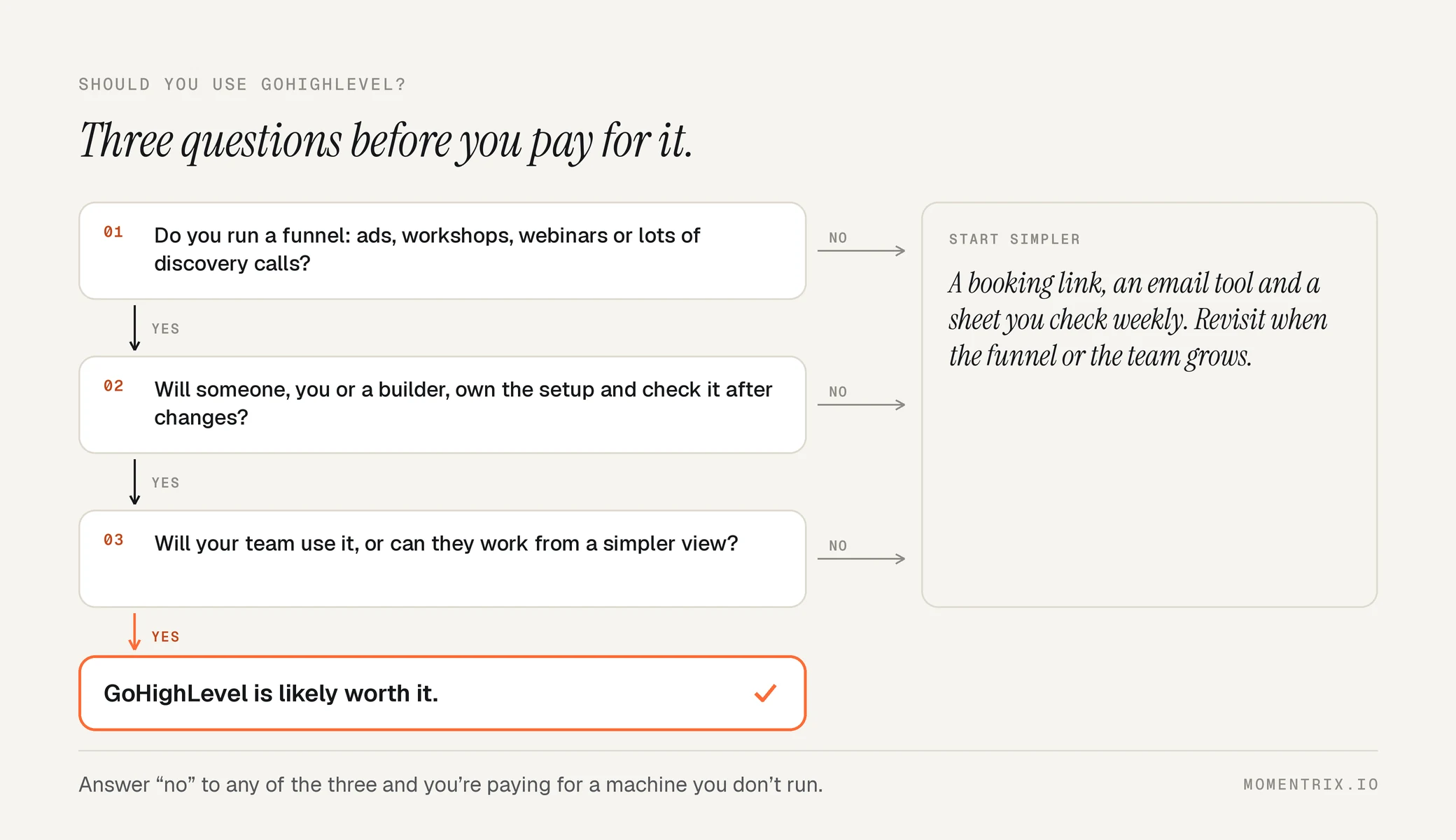
My short answer:
- Worth it if you run a funnel (ads, workshops, webinars or a lot of discovery calls), have or plan a small team, and want your CRM, calendars, emails, texts and pages in one place.
- Not worth it (yet) if you are a solo coach filled by referrals, with a handful of clients and a booking link that already works. You’d be paying for a marketing machine you don’t run.
- Either way: it is a builder’s tool. Out of the box it does very little. Every calendar, template and automation has to be set up and checked by someone.
What GoHighLevel does well for coaches
A pipeline that matches how coaching actually works
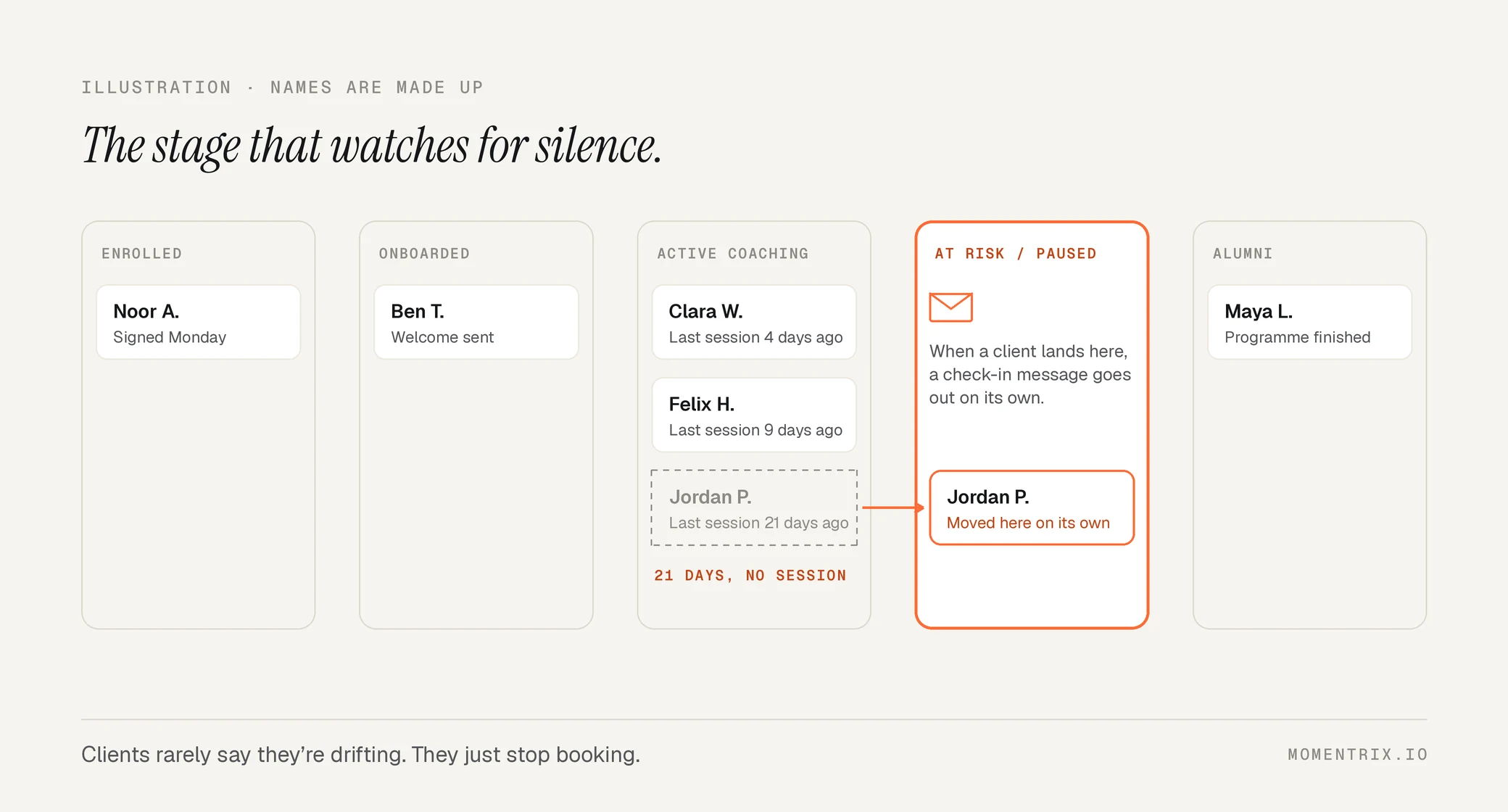
The part I’d keep in any build is the pipeline. In that practice, every client sits in one stage of a board: Enrolled, Onboarded, Active coaching, and so on through to Alumni. The owner can see the whole practice on one screen instead of keeping it in their head.
The most useful stage isn’t a happy one. Any client with no session for 21 days moves to “At risk / Paused” on its own, and a re-engagement message goes out. Clients rarely tell you they’re drifting; they just stop booking. A pipeline that notices silence is worth more than any funnel template.
One decision triggers the hand-offs
When a client is signed, the owner picks which coach takes them. That one choice assigns the client and the coach in the CRM and starts the onboarding steps. Before, that was several manual messages, any of which could be forgotten on a busy day. GoHighLevel’s workflows are good at this kind of “when X happens, do these five things” job.
Calendars with real control
GoHighLevel calendars let you set booking buffers, separate calendars per session type (onboarding, standard session, longer deep-dive, quick question) and still book a client manually outside your public hours. The owner keeps Fridays closed to the public but books the odd Friday session by hand. Coaches who flex their week like that need this, and many simple schedulers don’t do it well.
What broke, and what we changed
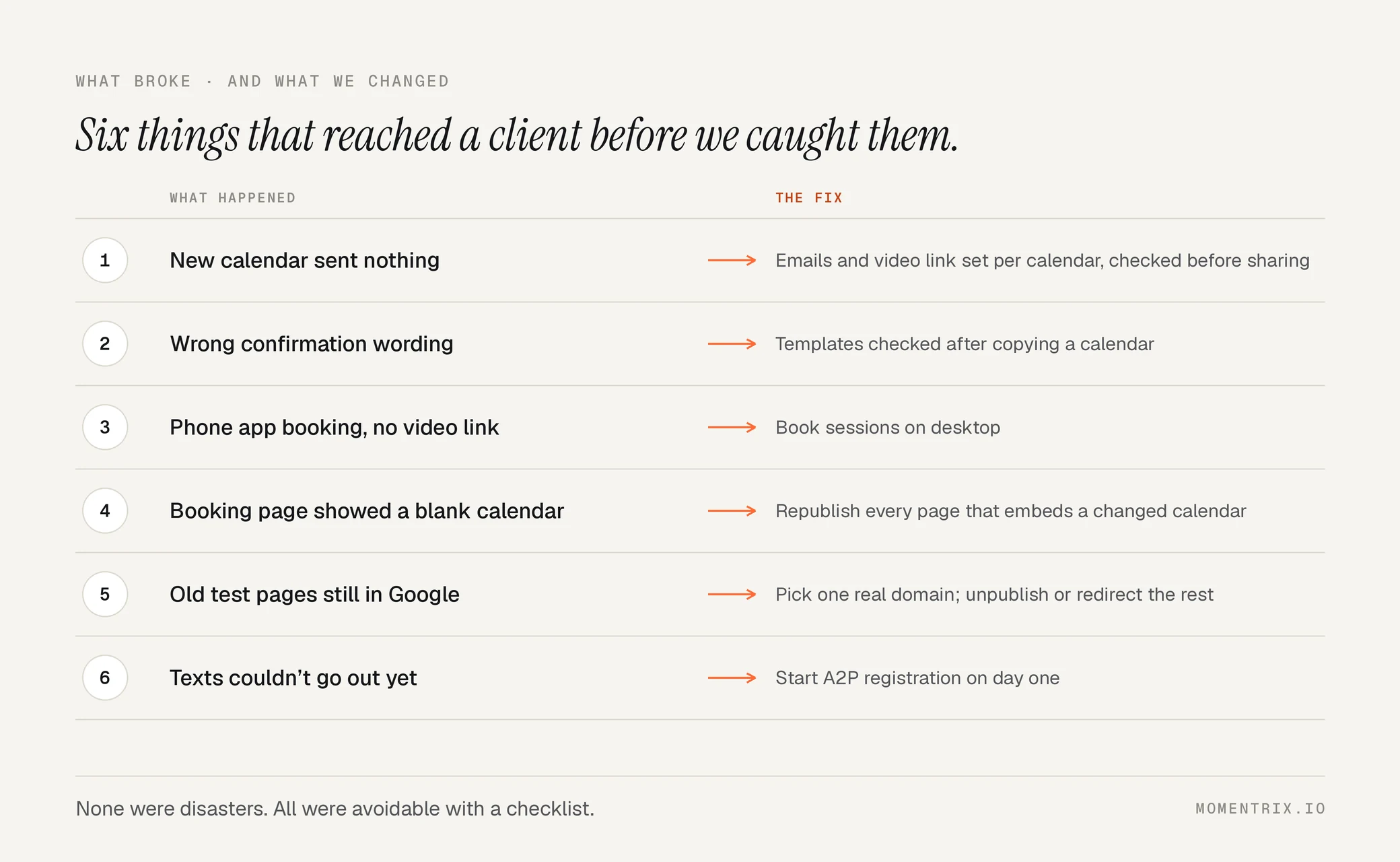
This is the part affiliate reviews leave out. None of these were disasters, but each one reached a client before we caught it.
1. A new calendar sent nothing
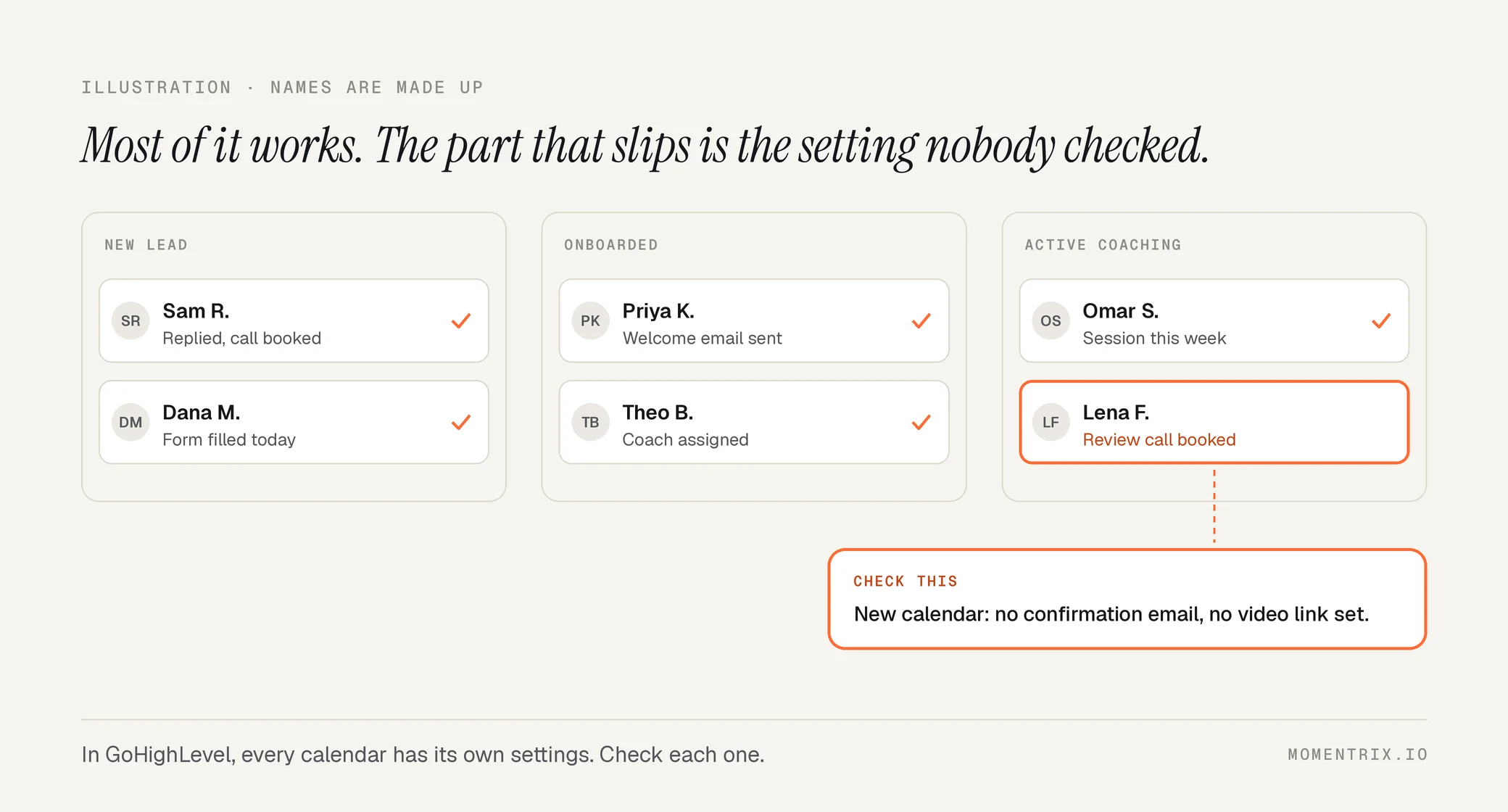
A client booked a review call and got no confirmation email and no video link. The calendar had been created later than the others, and nobody had set its notifications or its meeting location. In GoHighLevel these are set per calendar, and the Zoom integration only creates a link when Zoom is chosen as that calendar’s location.
What we changed: every new calendar now goes through the same short checklist before it’s shared (see the checklist below).
2. The wrong template went out
A booking confirmation went out with wording written for a different calendar. Same cause: templates are attached per calendar, and copying a calendar copies whatever was attached to it.
3. Booking from the phone app didn’t attach the video link
When the owner booked sessions from the GoHighLevel mobile app, the Zoom link wasn’t attached. Support told us it was a known problem. The workaround is boring but works: book on desktop.
4. A booking page that showed an empty calendar
A live booking page, linked from a QR code in a presentation, showed a blank space where the calendar should be. The calendar itself was fine. Republishing the page from the editor fixed it. Lesson: after you change a calendar, open every page that embeds it.
5. Old pages still showing up in Google
GoHighLevel can host pages on its own domains as well as yours. An old page on a second domain kept appearing in Google search after the owner had moved on. If you test pages in GoHighLevel, decide early which domain is the real one and redirect or unpublish the rest.
6. Texting isn’t instant
To send texts to US numbers you first need A2P 10DLC registration, which asks for business details and an ID, then a wait for approval. HighLevel’s own guide says to wait for “A2P Verified” before sending. Start it on day one, not the week you launch a campaign.
The real question: will your team use it?
GoHighLevel is a lot of software. The owner of that practice is comfortable in it. The other coaches on the team are not, and the owner’s first worry was exactly that: “every other coach has to be trained on GoHighLevel as well.”
So we didn’t force it. The owner manages the practice in GoHighLevel. The coaches see their own clients in a Google Sheet they already know, and the two stay in sync. When the owner picks a coach in the sheet, the CRM updates within seconds.
If you have a team, ask this before you buy: who will open GoHighLevel every day? If the answer is “only me”, plan the other people’s view first.
What GoHighLevel costs a coach
On HighLevel’s pricing page, checked on 20 November 2026, the Starter plan is $97 a month and the Unlimited plan $297 a month, with a 14-day free trial. A solo coaching practice needs one account, so Starter covers it.
The plan price isn’t the whole bill. Texts, emails, phone calls and the AI features are charged by usage on top, and the pricing page says so. The bigger cost is time: building calendars, templates, pages and workflows, then checking them. Budget for either your own hours or a builder’s.
The honest saving comes from what you switch off. In that practice, workshop sign-ups ran through a separate scheduler embedded on a GoHighLevel page, follow-ups went out from a separate email tool, and attendee lists were exported and imported by hand between them. Paying for GoHighLevel while keeping all the old tools gives you the cost of both and the convenience of neither.
Who should use it, and who should skip it
Use it if:
- you run a funnel with many leads: ads, workshops, webinars, lots of discovery calls;
- you have, or soon will have, other coaches or an assistant;
- you want leads, clients, calendars, emails and texts in one record;
- someone (you or a builder) will own the setup and check it after every change.
Skip it, for now, if:
- most of your clients come by referral and you can keep track of them without effort;
- your main need is packages, payments and a client portal. A coach-specific tool such as Paperbell is built around exactly that, and is simpler;
- nobody on your team will open it weekly.
Setup checklist for every new calendar
This is the list we now run before any booking link is shared:
- Confirmation and reminder emails switched on, with this calendar’s own wording.
- Meeting location set (Zoom or Google Meet), and a test booking shows the link.
- Correct coach assigned, and their own calendar checked for conflicts.
- Buffers and notice period set the way you actually work.
- Every page that embeds this calendar opened and checked after publishing.
- A test booking made from desktop and phone, then cancelled.
The broader rule behind it is the one I use for every system: if it needs you to remember it, it isn’t finished. More on that in coaching business automation.
FAQ
Is GoHighLevel good for coaches?
Yes, for coaches running a funnel or a small team who will invest in setup. For a solo, referral-based practice it’s usually more than you need.
How much does GoHighLevel cost for a coach?
On 20 November 2026 the Starter plan was $97 a month, which covers one practice. Texts, emails, calls and AI features are billed by usage on top.
Can GoHighLevel replace my scheduler and email tool?
It can handle calendars, email, texts and landing pages. The saving only comes if you actually move over and cancel the old tools.
Do my other coaches have to use GoHighLevel?
Not necessarily. In one practice I work with, the owner runs GoHighLevel and the coaches work from a synced Google Sheet.
How long does GoHighLevel take to set up for a coaching business?
It depends on how much you move in. Text messaging to US numbers needs A2P registration and approval first, so start that early.
Where this leaves you
If you already pay for GoHighLevel and things still slip (a client who never got a link, a lead who never got followed up), the tool usually isn’t the problem; the setup is. Related reading: coaching lead follow-up, client onboarding and client retention.
If you’d like a second pair of eyes on your own GoHighLevel account, or on whether you need it at all, the free 30-minute snapshot call maps where things slip in your practice. You leave with the fix list, whether or not you work with me.
How this page was made: I wrote it from my own builds in GoHighLevel for a coaching practice (details anonymised, no client names). AI tools helped draft and structure it; I checked every claim, price and example before publishing. How we write.
Set up with care and owned by someone, GoHighLevel for coaches earns its place; left half-built, it’s just another login.