Coaching business automation: what to automate between calls, and what to keep personal.
Coaching business automation should take the remembering off your plate, not the relationship.
By Rexhen Doda · How this page was made: see the note at the end.
What coaching business automation actually means
Most guides on this topic hand you a tool list and tell you to automate everything. I build these systems for coaches, and that’s not where I start.
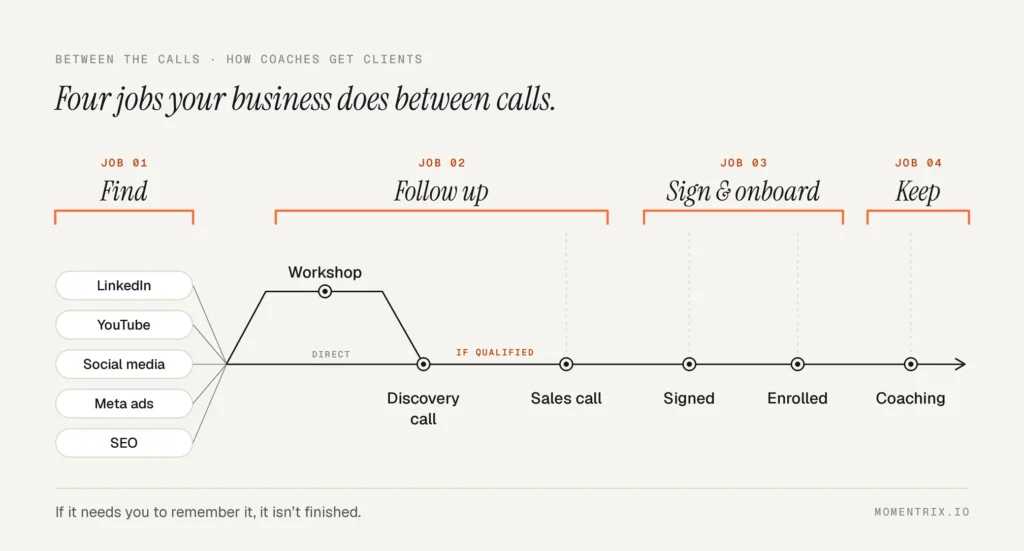
I start with one question: what are you currently holding in your head? The follow-up you meant to send. The client who went quiet three weeks ago. The contract you still need to email. Each of those is a job your business does between calls, and right now you are the system.
Here is the rule I use to decide whether a system is done:
If it needs you to remember it, it isn’t finished.
Everything on this page comes back to that. A coaching business does four jobs between calls. Each one gets one rule.
The four jobs, one rule each
1. Find: every lead gets a source
Most coaches I work with get their clients through referrals. That’s a good problem, until referrals slow down and you have no idea which other channel ever worked, because nobody wrote down where each lead came from.
The rule: no lead enters your system without a source attached (referral from whom, podcast, LinkedIn, a talk). It costs one field on a form. Six months later it tells you where to spend your time.
Before Momentrix I was head of marketing at Purple Circle, a business coaching company, where I built its client funnel and hosted more than 400 episodes of its podcast, Success Leaves Clues. The lesson that stuck: the channel only became a system once every booked call could be traced back to the episode or post that started it.
More on this: How to get coaching clients.
2. Follow up: capture it where you already are
Leads rarely say no. They go quiet, and the follow-up never happens because it lived on a sticky note. Speed matters too: research published in Harvard Business Review found that most companies don’t respond to online leads nearly fast enough, and the odds of reaching a lead drop quickly with every hour.
The rule: the follow-up gets created at the moment you think of it, in the place you already are, not later at your desk.
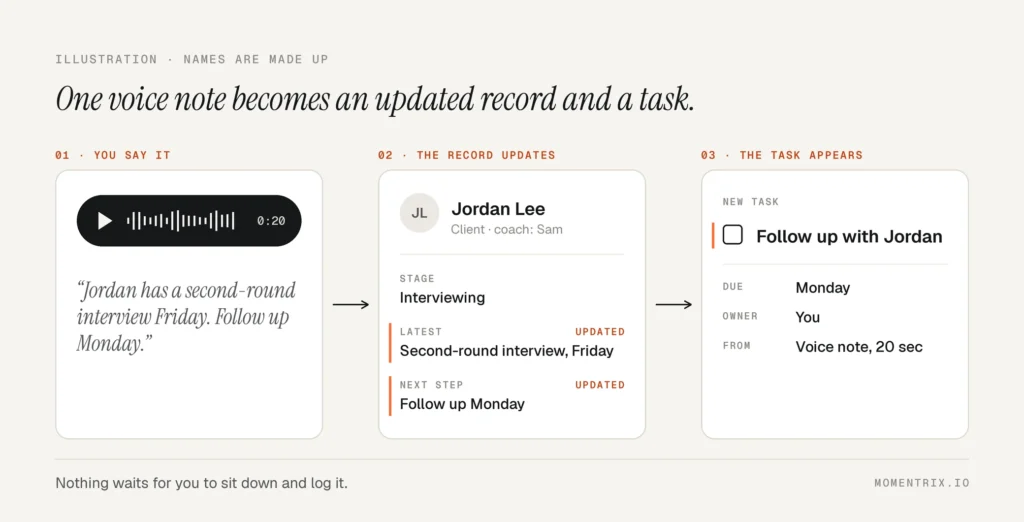
For one coaching practice I work with, the owner hates typing. So he sends a 20-second voice note, something like “she has a second-round interview Friday, follow up Monday”, and the CRM updates that client’s record and sets the task. Nothing waits for him to sit down and log it.
More on this: Coaching lead follow-up.
3. Sign and onboard: one decision triggers the rest
A client says yes. Then they wait two days for a contract, a payment link, a welcome email and a booking link, each one sent by hand.
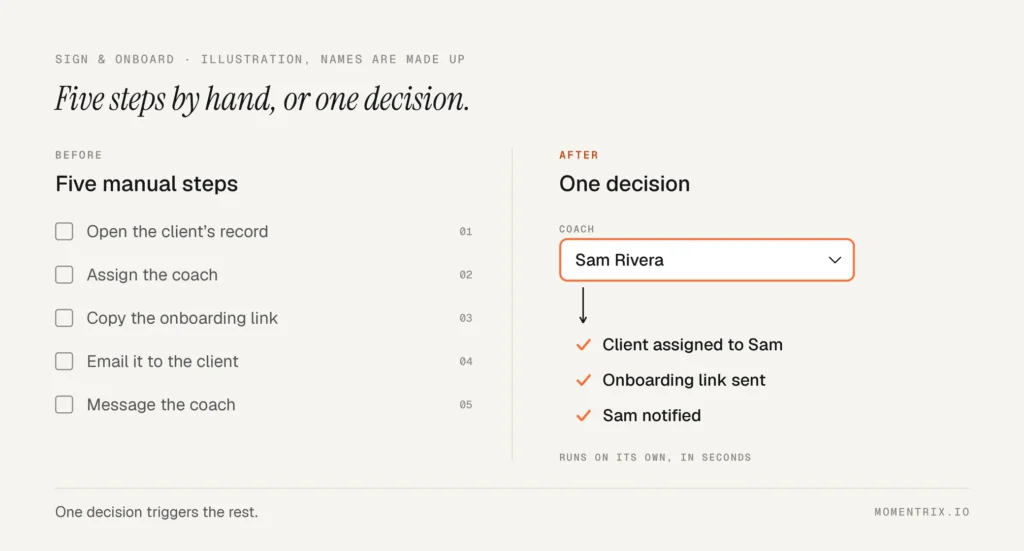
The rule: you make one decision (“this client is in, with this coach”) and everything after it runs on its own.
In that same practice, the owner picks a coach from a dropdown. Within seconds the client is assigned to that coach in the CRM, receives their onboarding link, and the coach is notified. Before, that was five separate manual steps, and any one of them could be forgotten on a busy day.
More on this: Coaching client onboarding process.
4. Keep: silence is a signal
Clients rarely announce that they’re drifting. They just stop booking. By the time you notice, they’ve mentally left.
The rule: the system watches for silence so you don’t have to. In that practice, any client with no session for 21 days moves to an “At risk / Paused” stage automatically, and the coach gets a task to check in.
Notice what’s automated and what isn’t. The system spots the silence. The coach writes the message.
More on this: Coaching client retention.
What I keep human (and you should too)
Automation that tries to be you is the fastest way to lose the trust your practice runs on. These stay personal in every system I build:
- The discovery call. Booking and reminders are automated. The conversation, and the decision about fit, are yours.
- The check-in after a client goes quiet. The system tells you who; you write it.
- Hard conversations: pausing, refunds, ending an engagement.
- The referral ask. A reminder can tell you the moment is right. The ask itself comes from you.
- What goes into session notes. Tools can transcribe and file. Judging what matters is coaching.
Confidentiality belongs on this list too. The ICF Code of Ethics asks coaches to maintain, store and dispose of records, including electronic files and communications, in a way that protects confidentiality, security and privacy (Standard 7). Every automation that moves client notes around is part of that duty. The ICF’s own piece on privacy and confidentiality is a good checklist for who and what can see your client files.
Where automations break: a mistake we made
Here’s one that bit us. In that coaching practice, a workflow filed each session transcript into the right client’s folder, but only if the meeting name contained words like “coaching session” or “onboarding session”. When a new call type was added with a different name, those transcripts quietly stopped arriving. No error, nothing missing on the surface.
Two things I do differently since:
- I don’t build automations that depend on how someone types a meeting name, unless there’s no other option.
- Every automation that can fail silently gets a check: if nothing came through in X days, someone gets told.
That’s the honest cost of automation: it doesn’t remember things for you forever. It moves the remembering into a system that someone has to look after.
How to start (without buying anything)
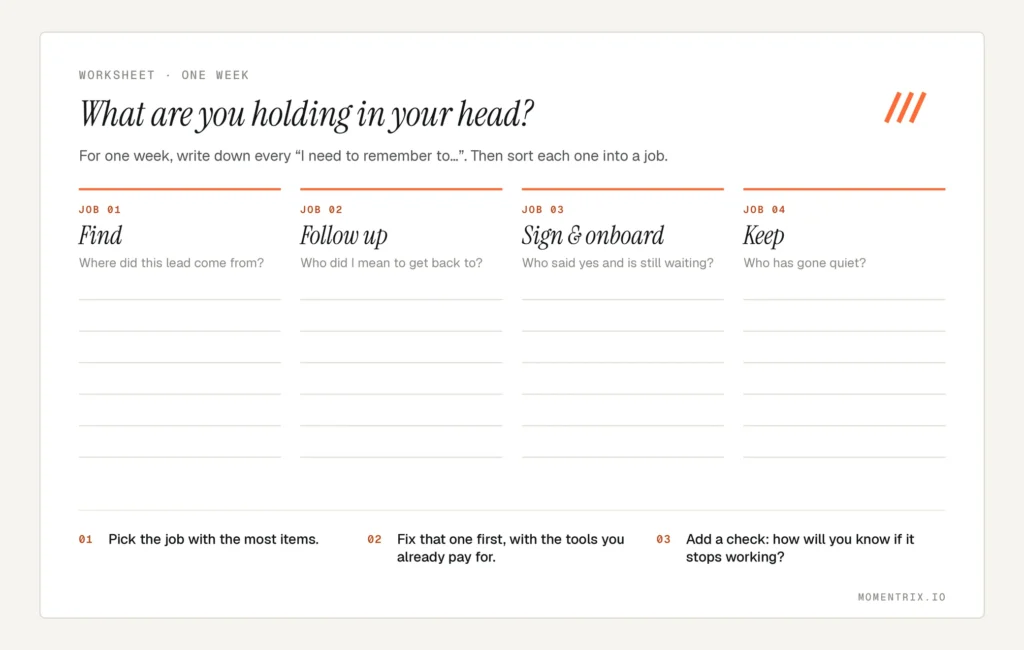
- List what you’re holding in your head. One week, write down every “I need to remember to…”. The list is usually longer than you expect.
- Sort each item into one of the four jobs: find, follow up, sign and onboard, keep.
- Pick the job with the most items. That’s where things slip for you.
- Fix that job first, with the tool you already pay for. Most CRMs and booking tools can do more than you’re using.
- Add the check: how will you know if it stops working?
Coaches usually ask.
- What should a coach automate first?
- Whichever of the four jobs holds the most “I need to remember to…” items for you. For most solo coaches that’s follow-up; for small teams it’s usually onboarding.
- Do I need GoHighLevel or another all-in-one tool?
- No. Start with the tools you already have. Switching platforms is sometimes right, but it’s rarely the first fix.
- Will automation make my practice feel impersonal?
- Only if you automate the wrong things. Automate the reminders, hand-offs and paperwork; keep the conversations human.
- Is it safe to automate anything that touches client notes?
- It can be, if you know where every copy of a client’s information ends up and who can see it. Treat it as part of your confidentiality duty, not as a tech detail.
Not sure which job is leaking for you? Start with the free snapshot.
If you read the four jobs and one of them sounded uncomfortably familiar, start with that one. The free 30-minute snapshot call is for exactly this: we look at the one job where things slip in your practice and you leave with the fix list, whether or not you work with me.
Book a free 30-minute snapshotHow this page was made: I wrote it from real builds for coaching clients (details anonymised). AI tools helped me draft and structure it; I checked every claim and example before publishing. How we write.
Get the remembering out of your head and into a system you trust: that’s what coaching business automation is for.